Western Union UX CASE STUDY · MOBILE APP

Western Union
App home / dashboard page design
for United states

A new home page for the Western Union app (sender country: United States) that puts quick actions, transfer summaries and services one tap away — designed end-to-end across four user scenarios, from a logged-out first-timer to a repeat sender resuming a transfer.

ROLE Product / UX Designer — end-to-end
SCOPE Research · Personas · Wireframes · UI · Flows
TOOLS Figma · FigJam · Zoom · Excel
TYPE New feature

Problem

The app lacked a true home: no single place for quick actions, transfer status, offers and services. Logged-out users hit friction before they could even try the product.

Approach

Benchmarked 17 direct and indirect competitors, mapped 4 user scenarios, explored 8 wireframe directions and a full widget library, then locked a per-scenario widget priority matrix.

Solution

A personalized dashboard that surfaces the most relevant actions for each user — encouraging first-time users to explore the product before registering, and seamless resume-and-resend transfers workflows for repeat senders.

01 — THE BRIEF

Introduce a new home / dashboard page for the Western Union app

Sender country: United States (US). The reason for launching this page: provide quick actions, a summary, and multiple services or features on the home page, so users can easily access everything from one place.

What the home page needed to hold

Send money Resume transfer widget Check FX rate Offers / Promotional Referral / Rewards program Profile Footer navigation Other opportunities
02 — CONTEXT

About Western Union in the US

Western Union is a global leader in cross-border, cross-currency money transfer services. Through its digital channels, it helps people and businesses move money to more than 500,000 agent locations in over 200 countries and territories, in more than 130+ currencies.

10M+
Mobile app downloads
100M+
Total customers
1.8M+
Monthly active users
2M+
Transactions per month
30M+
Transactions per year
US $500–600
Avg. transaction value
03 — PERSONAS

Four user states, four different mental models

Instead of demographic personas, the home page is designed around the states a user can arrive in — each with its own mindset and its own UX objective.

1

Logged out — first time user, no transfer

User mental model: Explore the product, compare with competitors, learn about offerings.

UX objective: Reduce friction to start sending money — engage first, then register.
2

Logged out — repeat user with past transfers

User mental model: Wants to send money, check the exchange rate and any offers.

UX objective: Motivate to log in, transfer or resend.
3

Logged in — repeat user, no transfer

User mental model: Still ready to explore, could be slightly unsure; may still compare offerings and exchange rates with competitors.

UX objective: Convert the user — motivate to transfer and complete the transfer.
4

Logged in — repeat user with past transfers

User mental model: Resend; wants to send money, check the exchange rate and any offers.

UX objective: Make resend and send money instant; surface rates and offers.
04 — RESEARCH

Direct & indirect competitor benchmark

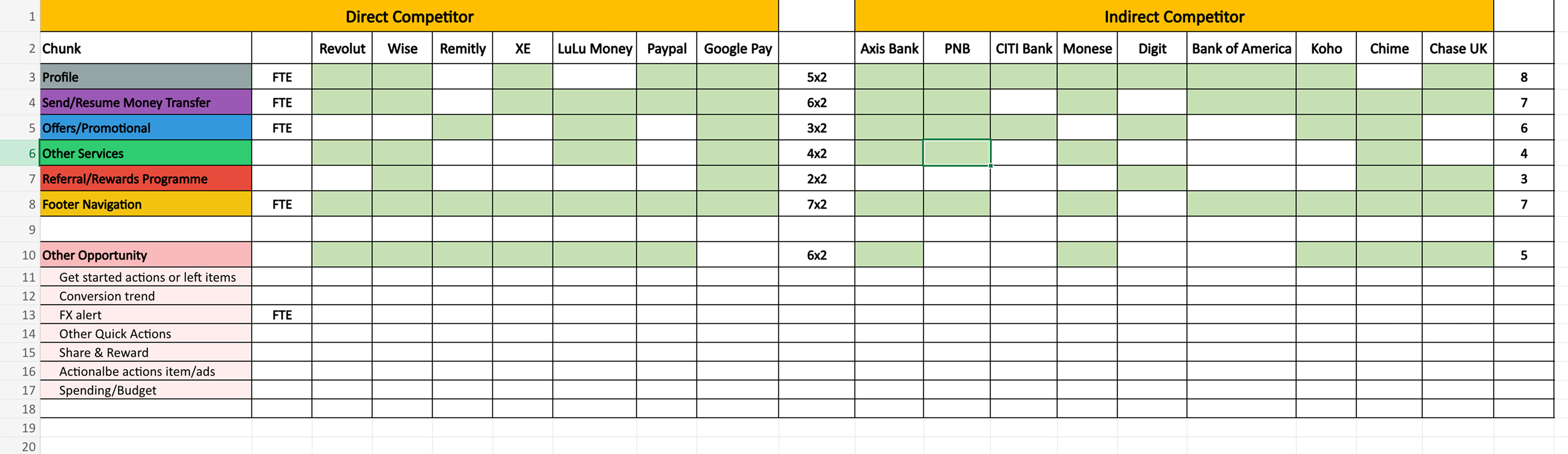
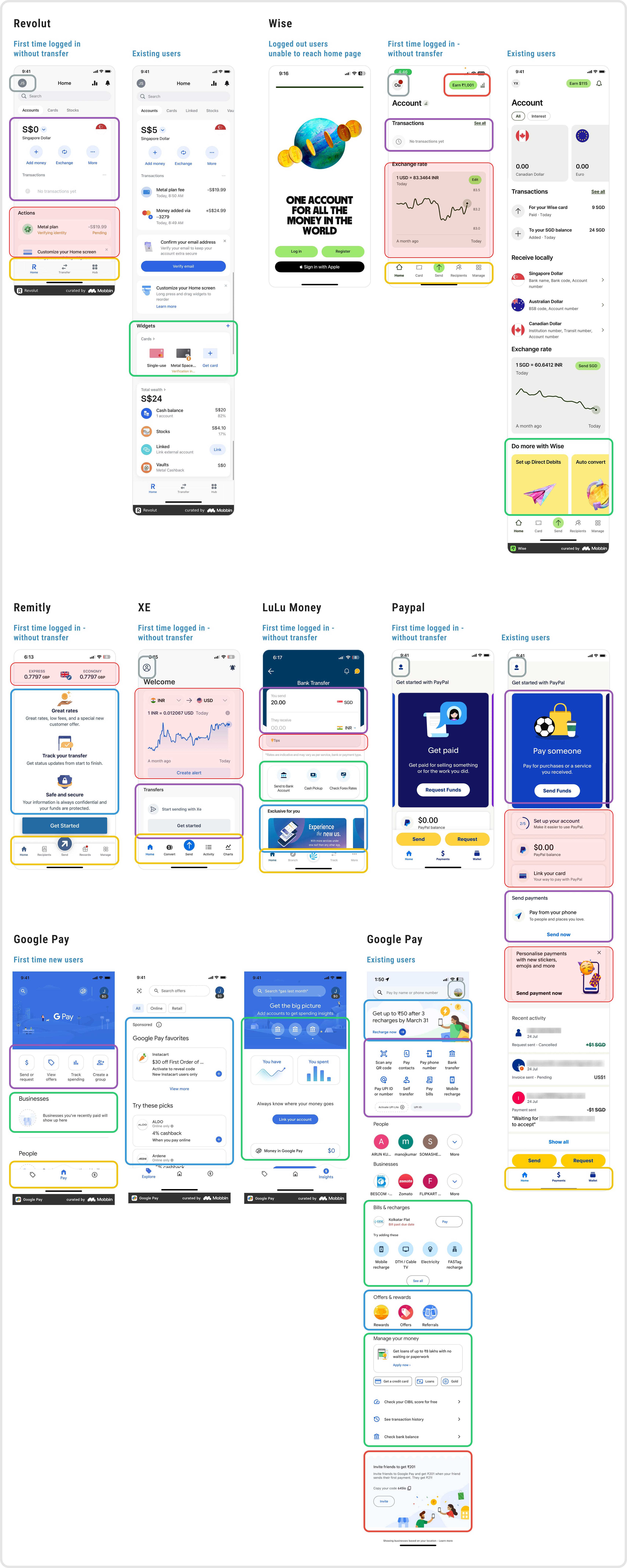
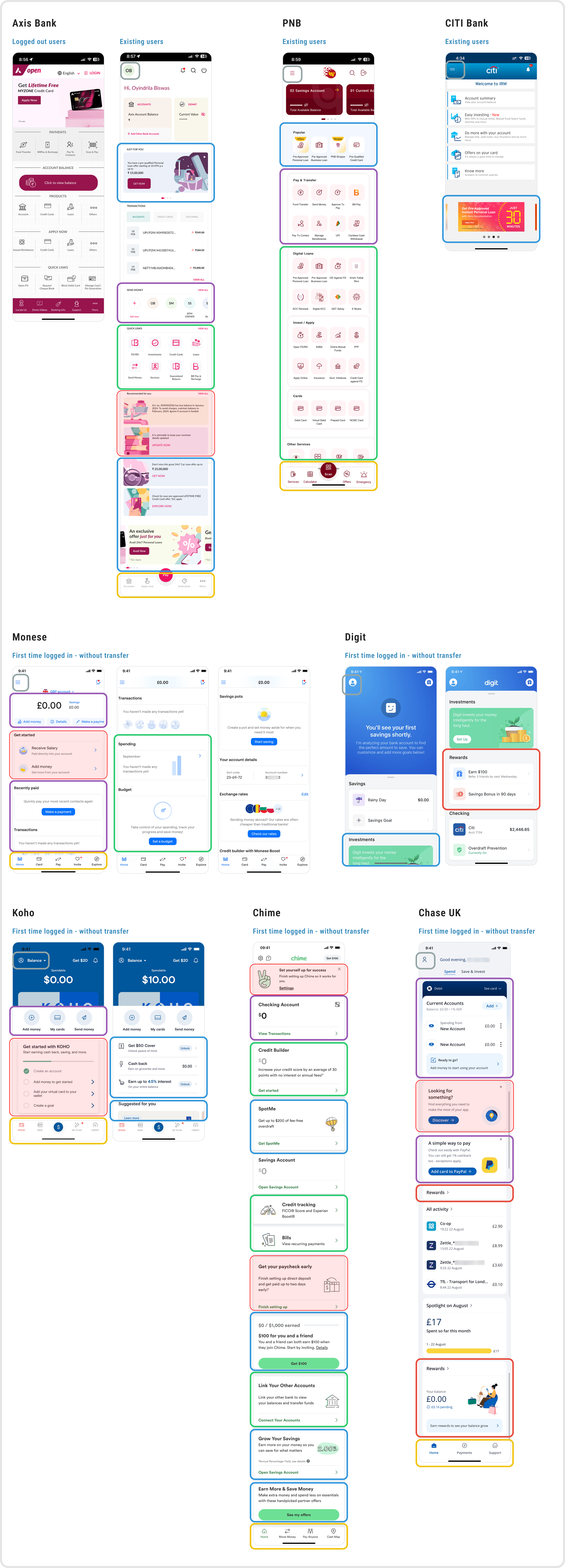
17 apps were audited across the same states the personas describe — first-time logged-in without a transfer, existing users, and (where reachable) logged-out home pages. Remittance specialists were treated as direct competitors; banks and neo-banks as indirect references for dashboard patterns.

Spreadsheet mapping direct and indirect competitors against home page features audited

Direct competitors

Direct competitor screenshots: Revolut, Wise, Remitly, XE, LuLu Money, Paypal, Google Pay

Indirect Competitors

Indirect competitor screenshots: Axis Bank, PNB, CITI Bank, Monese, Digit, Koho, Chime, Chase UK
05 — DESIGN EXPLORATIONS

Wireframe / Design explorations
(Logged out and Logged in user use case)

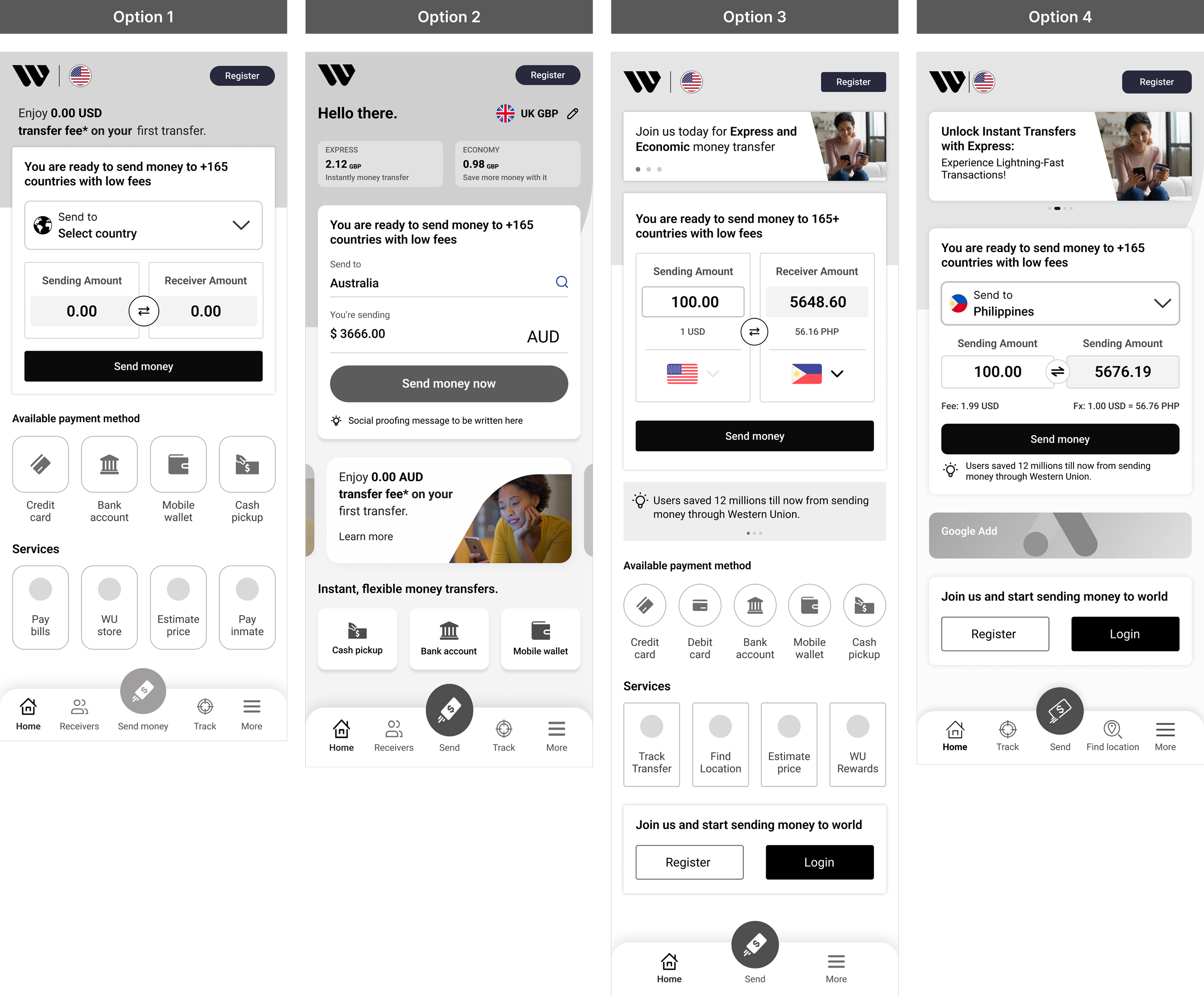
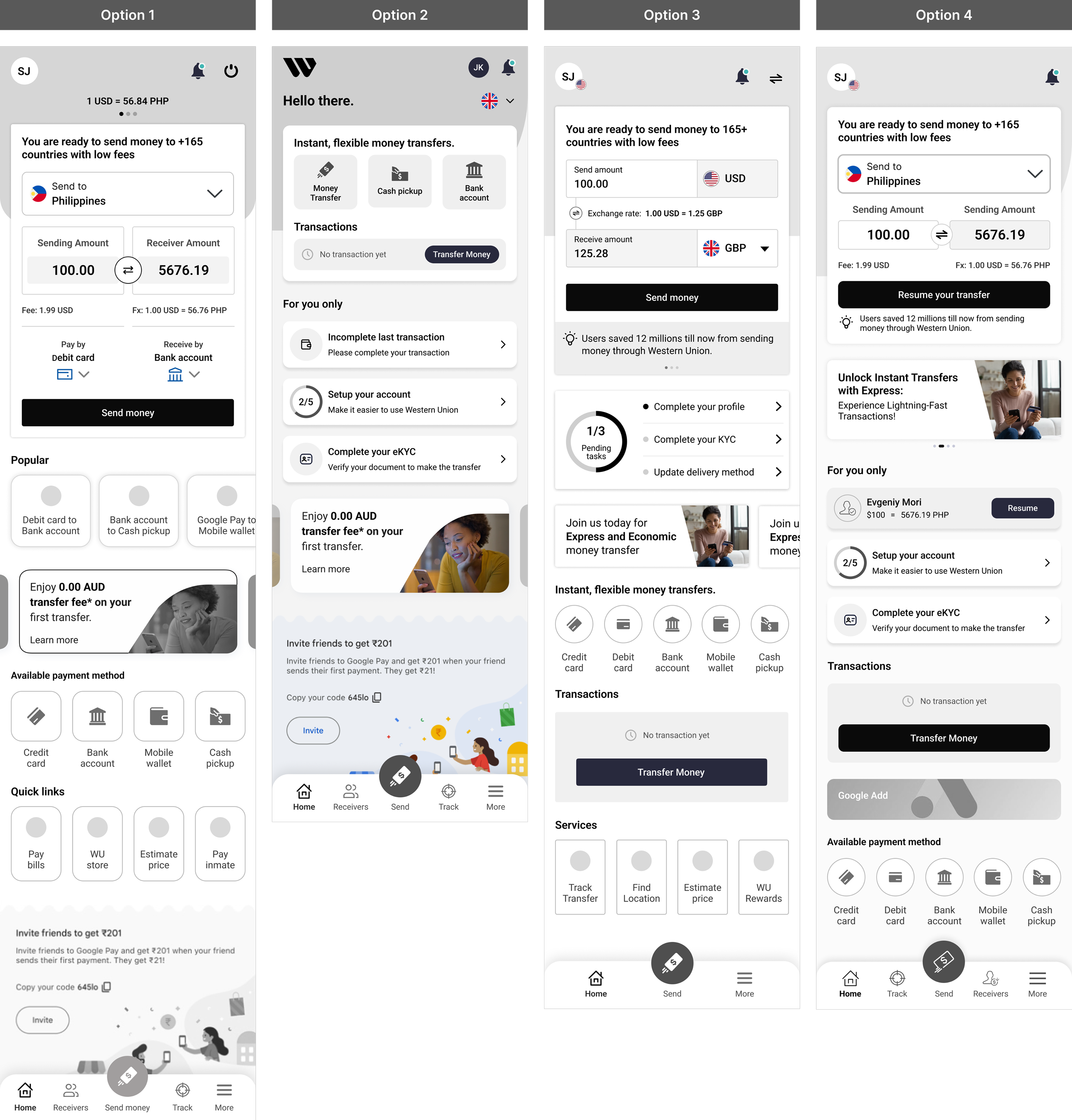
For each of the two core use cases — logged-out and logged-in first-time users — four dashboard structures were explored, testing where the send-money widget, value propositions, payment methods, services and bottom navigation should live.

Logged-out user (first time)

Four wireframe direction options for the logged-out first-time user home page

Logged-in user (first time)

Four wireframe direction options for the logged-in first-time user home page
06 — WIDGET EXPLORATIONS

A modular widget library for the dashboard

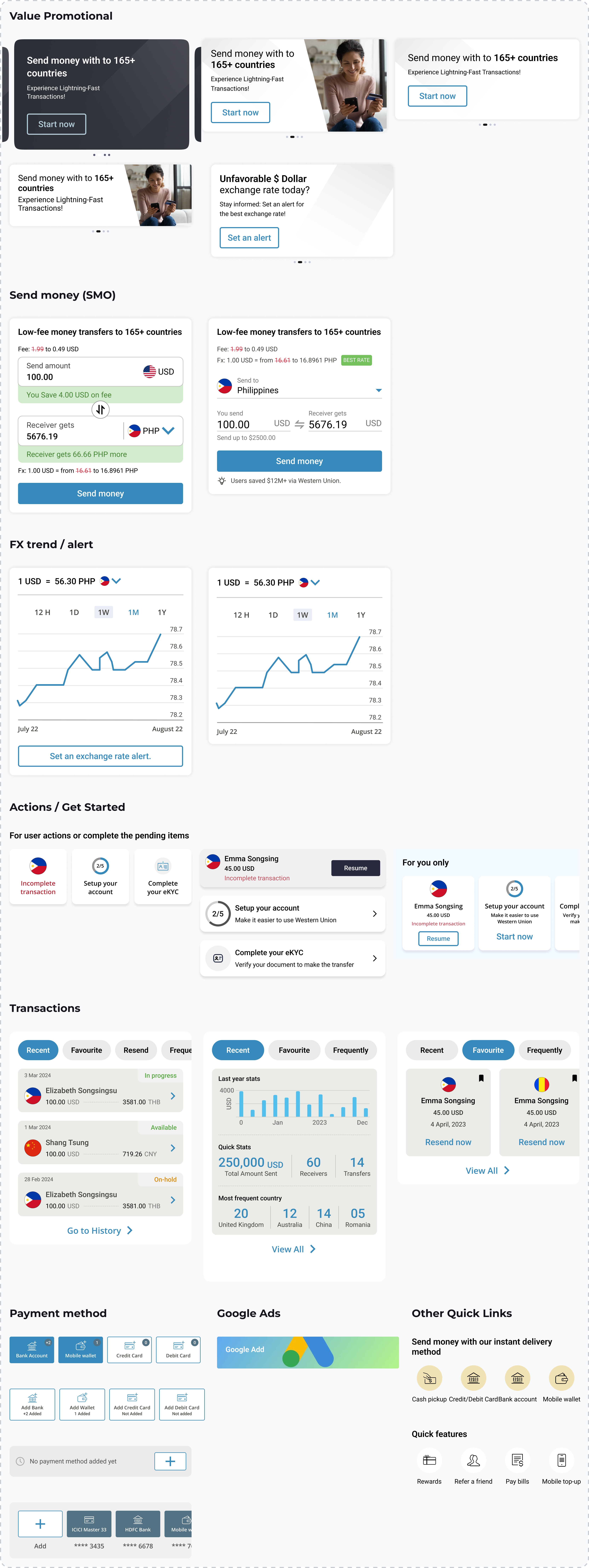
Every candidate widget was designed as an interchangeable module so the dashboard can be recomposed per user state.

Value Promotional Send money (SMO) FX trend / alert Actions / Get started Transactions Payment method Quick actions KYC / Complete profile Google Ads slot

Dashboard widget variations

Full set of dashboard widget variations: value promotional, send money, FX trend/alert, actions/get started, transactions, payment method, Google ads and other quick links
07 — SCENARIOS & REQUIREMENTS

All scenarios, features, use cases & requirements

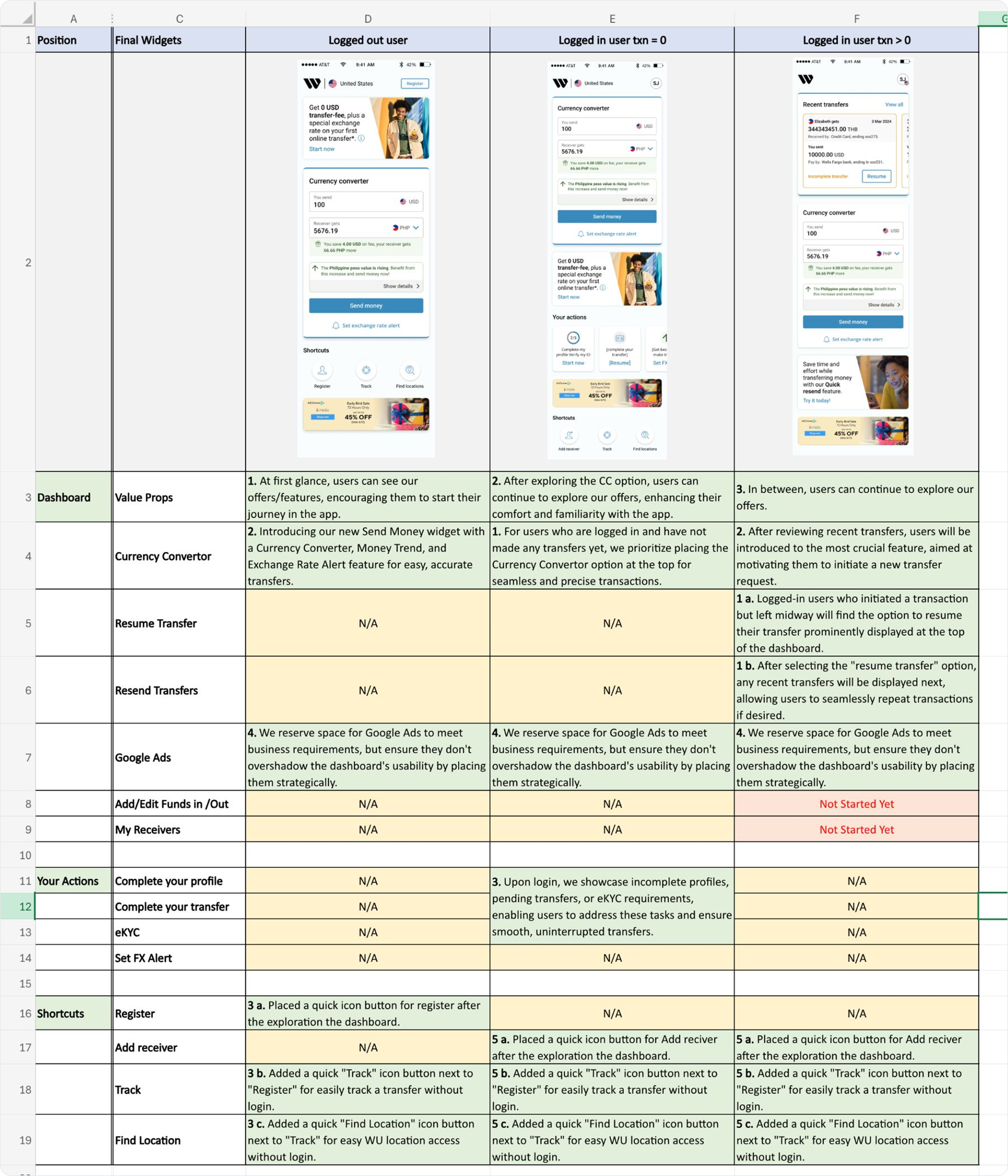
A single matrix maps every final widget to its position and rationale in each of the three dashboard states. Highlights:

Value props lead for new users

Logged-out users see offers first, encouraging them to start their journey; the send-money widget with currency converter sits directly beneath.

Resume & resend win for repeat users

Users who left a transaction midway find Resume at the very top; recent transfers follow so repeat sends are one tap.

Ads earn their place, carefully

Google Ads space is reserved to meet business requirements but placed so it never overshadows dashboard usability.

Matrix mapping every final widget to its position and rationale across logged-out, logged-in zero-transaction and logged-in repeat-transaction dashboard states
08 — USER JOURNEY

End-to-end app flow

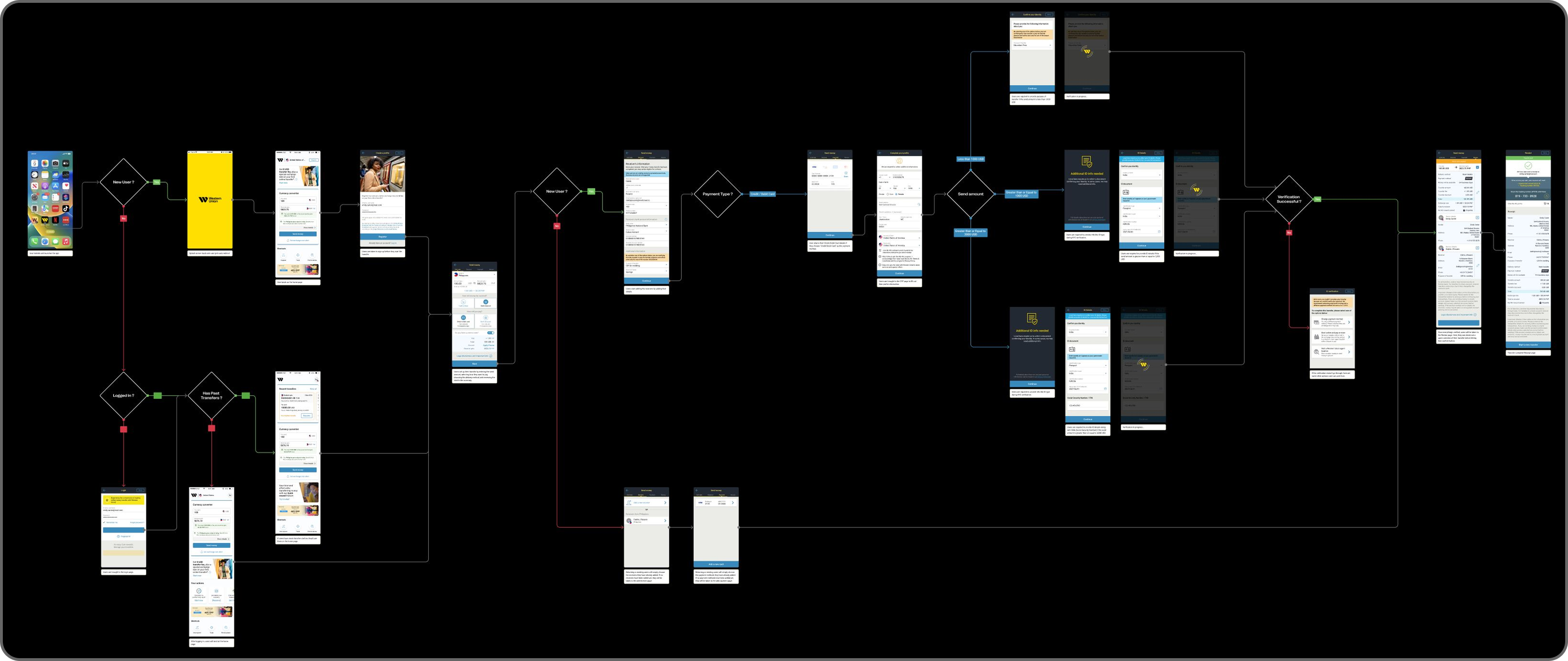
The complete journey — from a logged-out landing through registration, eKYC, transfer setup, payment and tracking — mapped screen by screen to verify the dashboard hands off cleanly into every downstream flow.

End-to-end app flow diagram from logged-out landing through registration, eKYC, transfer setup, payment and tracking
09 — FINAL DESIGN SOLUTIONS

One dashboard, three states

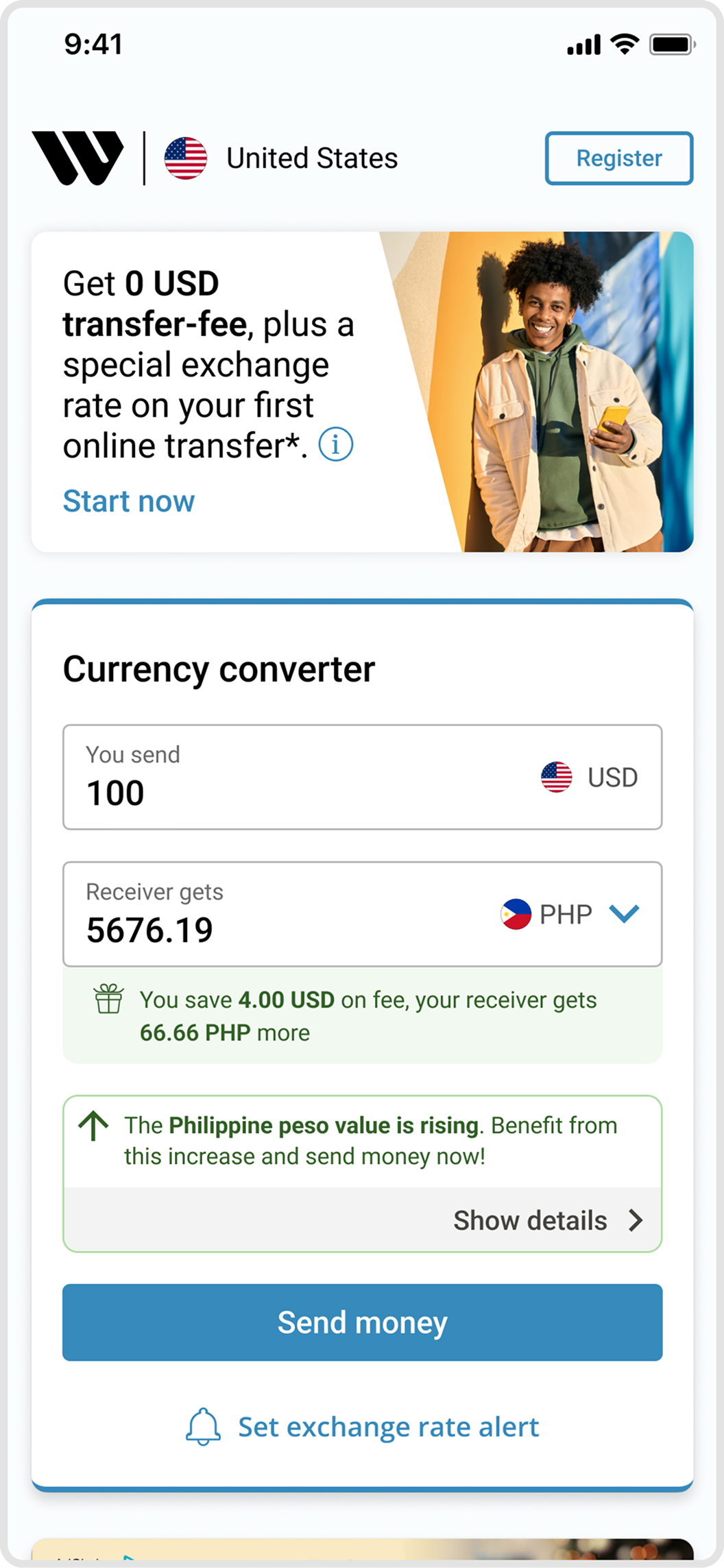
Scenario 1 — Home page
(not logged in)

  • Value-prop banner: 0 USD transfer fee + special first-transfer rate.
  • Full currency converter with fee savings and a live rate insight (“peso value is rising”).
  • Send money and Set exchange-rate alert without logging in.
  • Shortcuts: Register, Track, Find locations.
Scenario 1 — logged-out home page with value-prop banner and currency converter

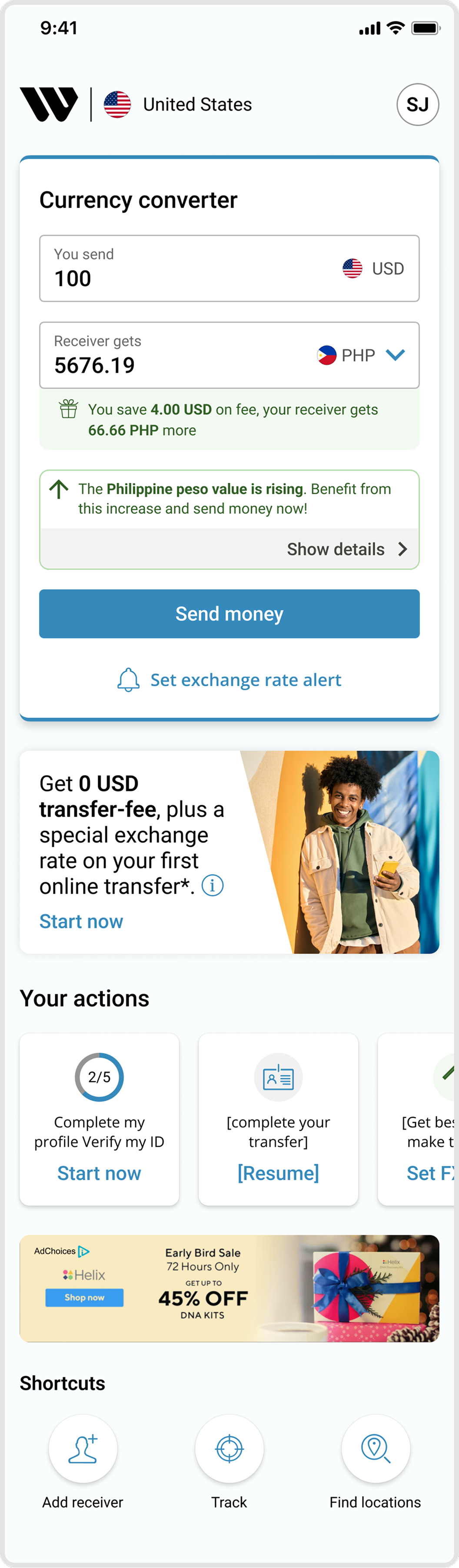
Scenario 2 — Logged in
(zero transactions)

  • Currency converter prioritized at the top for the first transfer.
  • “Your actions” (2/5): complete profile, verify ID, complete transfer, set FX alert.
  • First-transfer offer keeps motivating below the fold.
  • Shortcuts: Add receiver, Track, Find locations.
Scenario 2 — logged-in user with zero transactions, currency converter and your actions

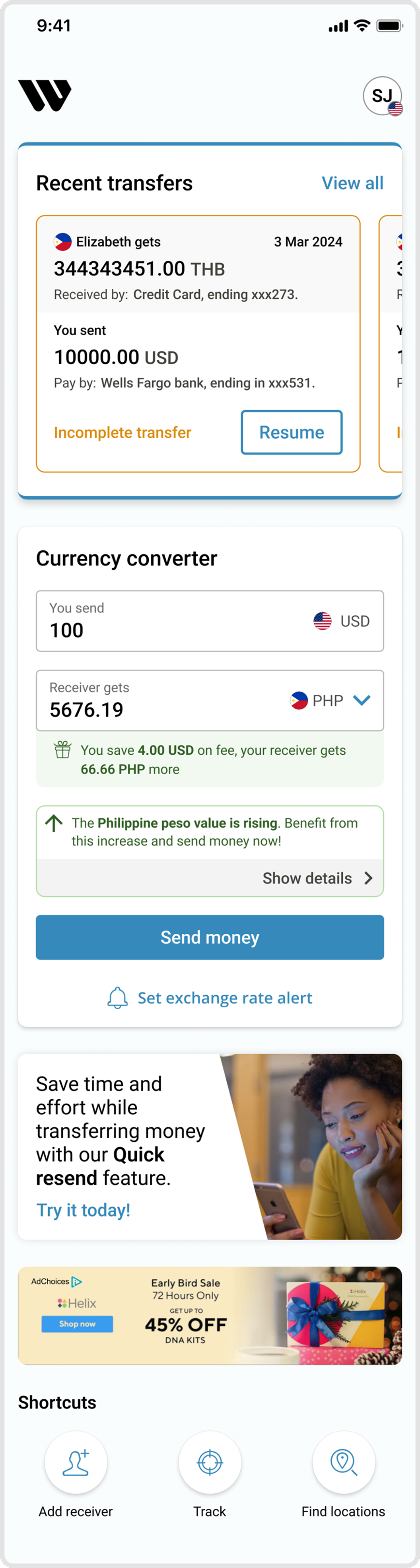
Scenario 3 — Logged in
(recent transfers)

  • Recent transfers on top: Resume an incomplete transfer, Resend a past one.
  • Quick-resend promo saves time on repeat sends.
  • Currency converter and FX alert remain a swipe away.
  • Shortcuts: Add receiver, Track, Find locations.
Scenario 3 — logged-in user with recent transfers, resume and currency converter

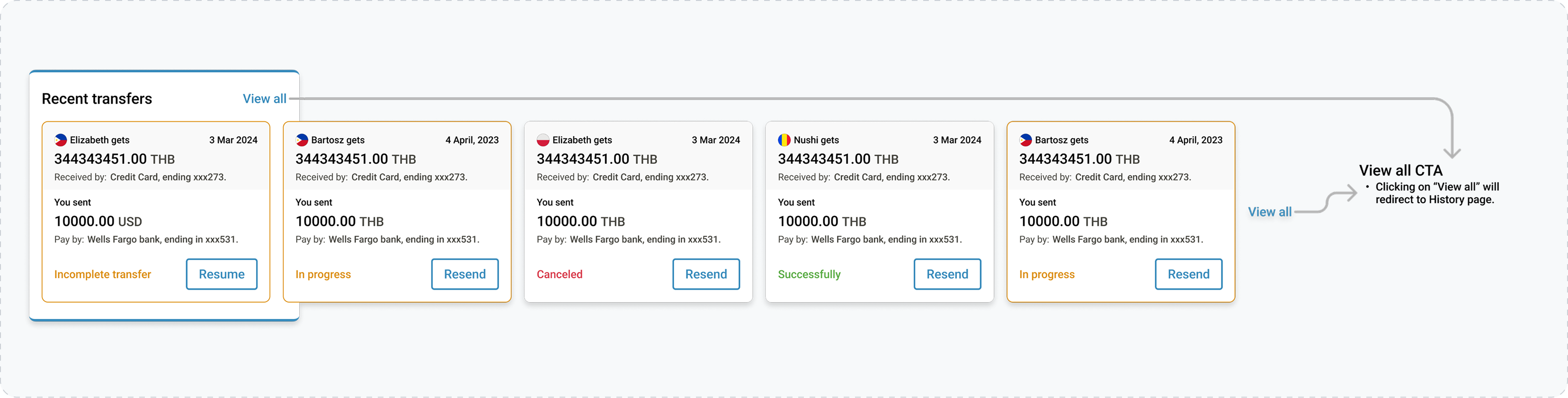
Recent transfer widgets

Recent transfers widget with resume and resend states, and a note that View all redirects to the History page
10 — KEY METRICS

Business impact / metrics

↑ 28%New registrations increased
↑ 15%KYC completion improved
↑ 8%Profile completion improved
↑ 18%Revenue from Google Ads increased
↑ 57%Zero-Fee offer redemption increased
↑ 9%Returning users increased

Thanks for watching